🌐 Kubernetes Networking Deep Dive
Services, Ingress, Gateway API, EndpointSlices, NetworkPolicies & DNS :
Documentation Link : https://kubernetes.io/docs/concepts/services-networking/
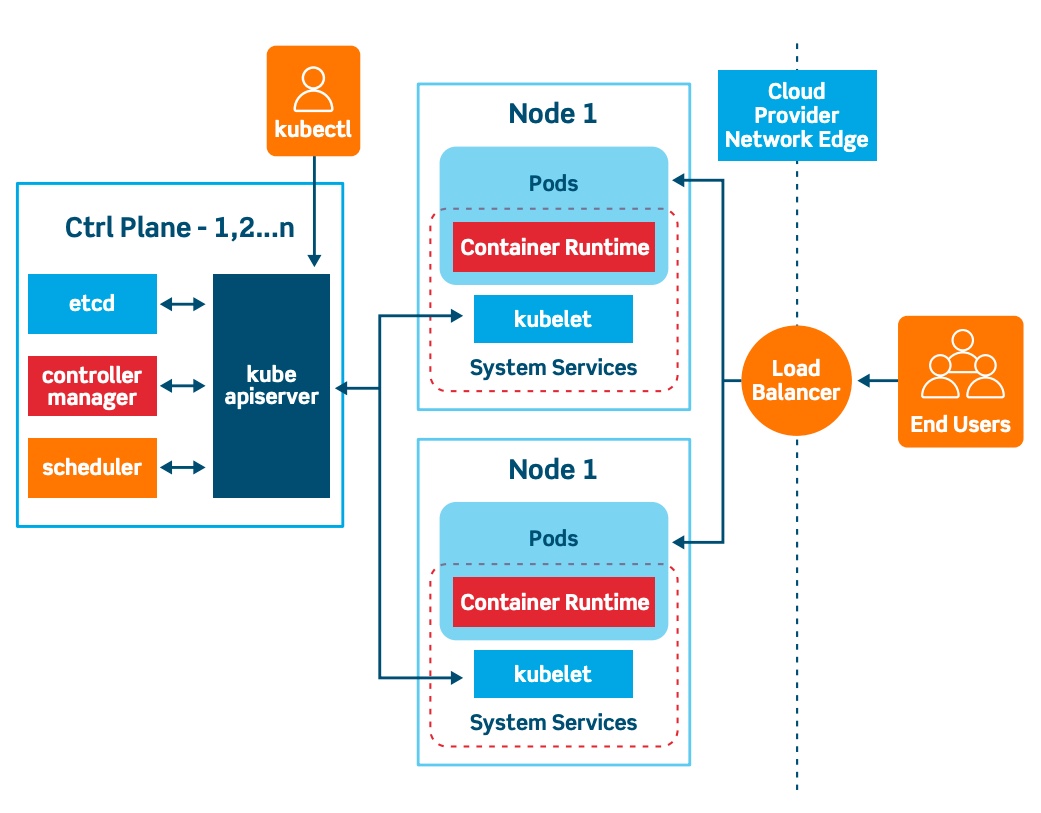
5
Introduction
Kubernetes networking is one of the most misunderstood yet most critical parts of running production workloads.
At first glance, it looks simple:
Pods talk to Pods
Services expose applications
Ingress brings traffic from outside
But under the hood, Kubernetes networking is a layered system involving:
Virtual IPs
EndpointSlices
Proxies
DNS
L3/L4 security policies
L7 traffic routing
This article provides a complete, end-to-end explanation of Kubernetes networking — from Pod communication to external traffic, including real YAML examples you can apply in production.
1️⃣ The Kubernetes Networking Model (Foundation)
Kubernetes follows a flat network model:
Core Rules
Every Pod gets a unique IP (cluster-wide)
Pods can communicate directly without NAT
Containers inside a Pod share a network namespace
Nodes can reach Pods
This makes Pods behave like VMs, not traditional containers.
👉 Kubernetes itself does not implement networking.
It defines the API, and a CNI plugin implements the behavior.
2️⃣ Services — Stable Networking for Ephemeral Pods
Why Services Exist
Pods are:
Ephemeral
Recreated frequently
Assigned new IPs
A Service provides:
A stable IP
A stable DNS name
Load balancing across Pods
ClusterIP Service (Default)
apiVersion: v1
kind: Service
metadata:
  name: my-service
spec:
  selector:
    app: myapp
  ports:
  - port: 80
    targetPort: 8080
Internal only
Resolves to a virtual IP
Backed by EndpointSlices
NodePort Service
spec:
  type: NodePort
  ports:
  - port: 80
    nodePort: 30007
Exposes service on every node
<NodeIP>:30007Useful for debugging or simple setups
LoadBalancer Service
spec:
  type: LoadBalancer
Cloud-provider managed
Provisions an external load balancer
Built on top of NodePort
Headless Service
spec:
  clusterIP: None
No virtual IP
DNS returns Pod IPs directly
Used by StatefulSets (databases, queues)
ExternalName Service
spec:
  type: ExternalName
  externalName: api.example.com
DNS-level alias (CNAME)
No proxying
Useful for migrations
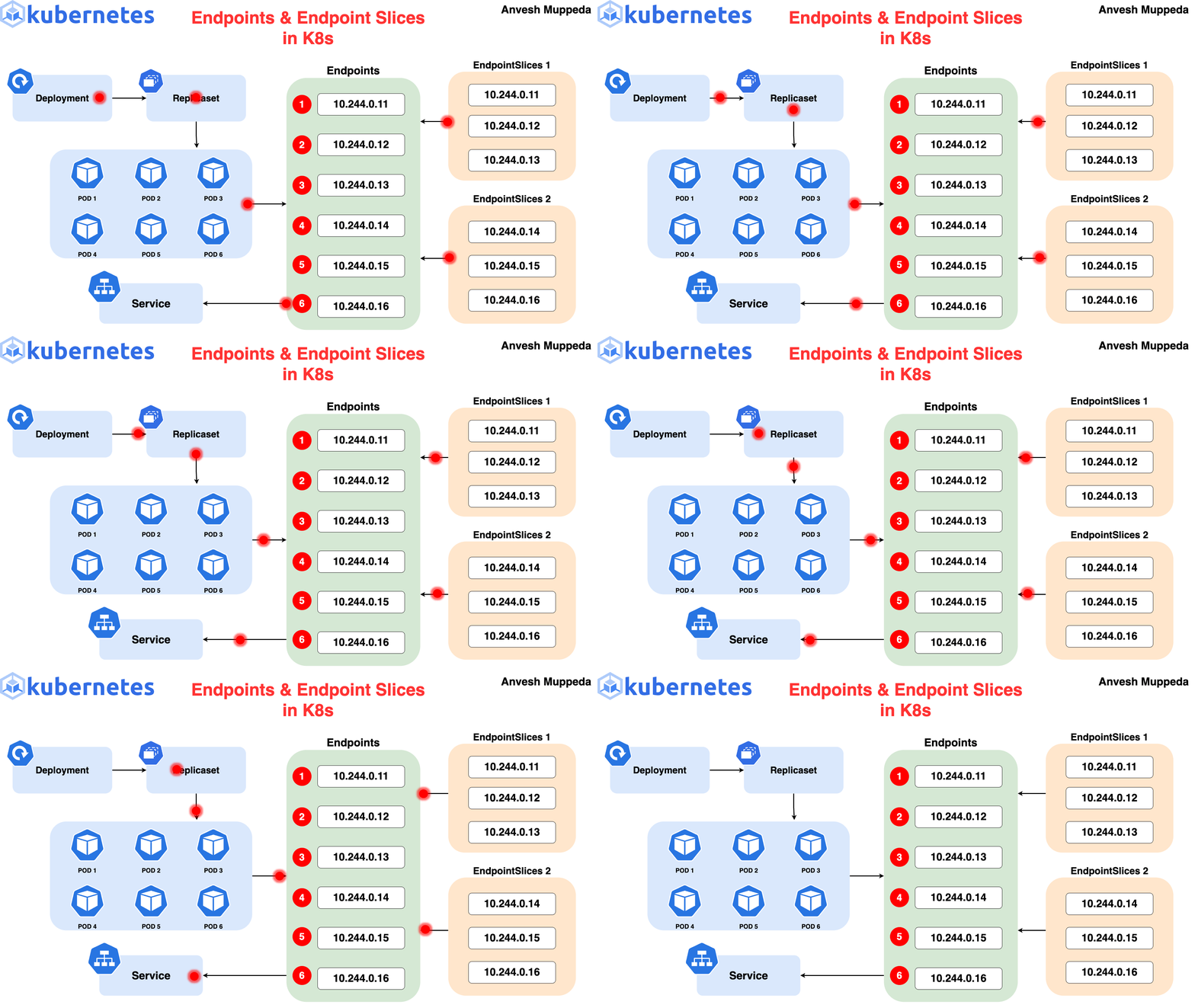
3️⃣ EndpointSlices — Scalable Service Backends
Services don’t route traffic directly to Pods.
They rely on EndpointSlices.
Why EndpointSlices?
The legacy Endpoints object:
Didn’t scale
Had a 1000-endpoint limit
Lacked topology data
EndpointSlice Example
apiVersion: discovery.k8s.io/v1
kind: EndpointSlice
metadata:
  name: my-service-abc
  labels:
    kubernetes.io/service-name: my-service
addressType: IPv4
ports:
- port: 80
  protocol: TCP
endpoints:
- addresses: ["10.1.2.3"]
  conditions:
    ready: true
  zone: us-east-1a
Key Features
~100 endpoints per slice
Supports IPv4 + IPv6
Includes readiness & topology
Used by kube-proxy
4️⃣ Ingress — HTTP/HTTPS Routing (Frozen API)
Ingress exposes HTTP(S) services using:
Hostnames
Paths
TLS
⚠️ Ingress is stable but frozen.
Kubernetes recommends Gateway API instead.
Ingress Example
apiVersion: networking.k8s.io/v1
kind: Ingress
metadata:
  name: app-ingress
spec:
  rules:
  - host: app.example.com
    http:
      paths:
      - path: /
        pathType: Prefix
        backend:
          service:
            name: my-service
            port:
              number: 80
What Ingress Does
L7 routing
TLS termination
Virtual hosting
What It Does NOT Do
TCP/UDP routing
Advanced traffic splitting (without annotations)
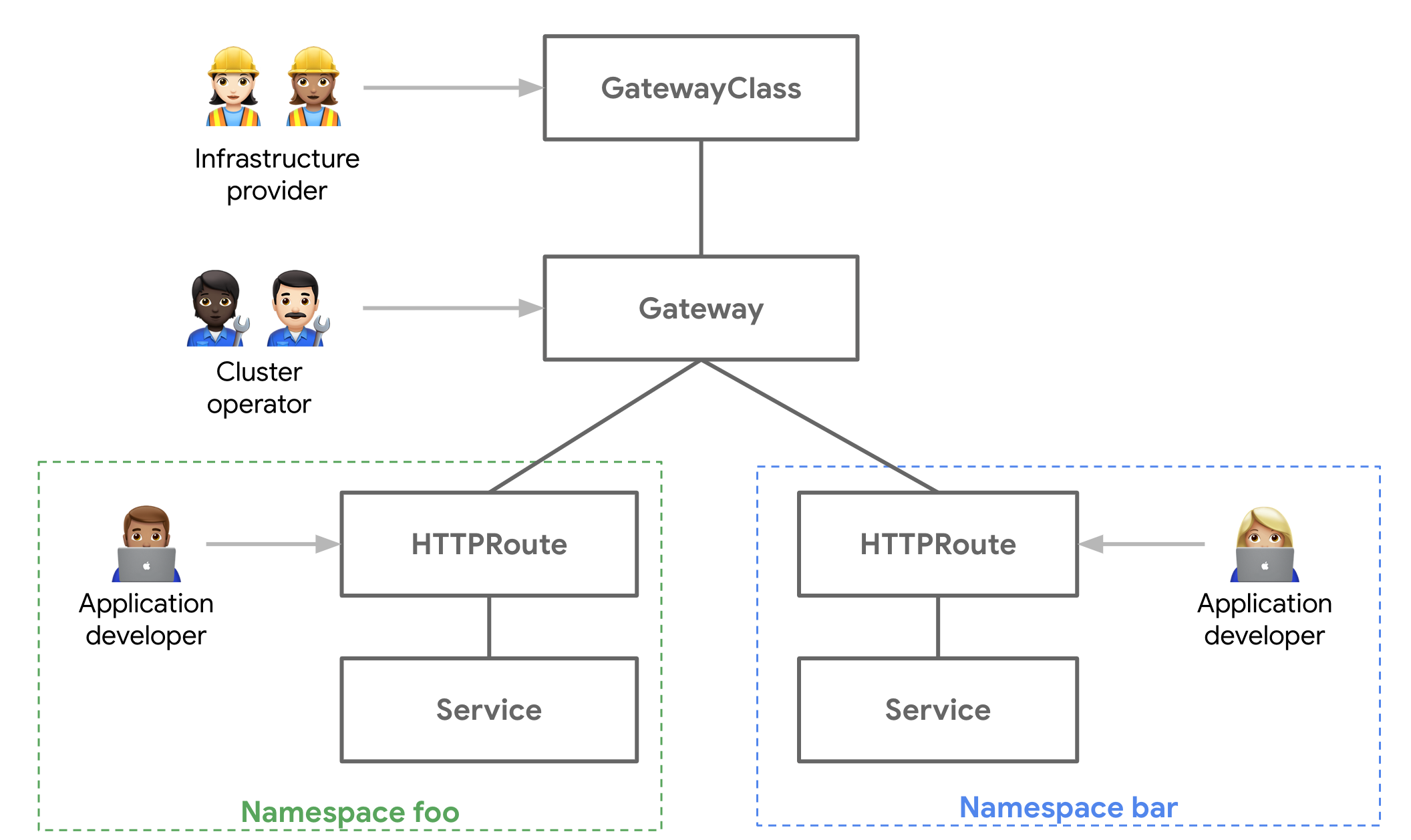
5️⃣ Gateway API — The Future of Kubernetes Traffic Management
Gateway API replaces Ingress with:
Better role separation
Native extensibility
Multi-protocol support
Core Resources
| Resource | Responsibility |
| GatewayClass | Implementation |
| Gateway | Traffic entry point |
| HTTPRoute | HTTP routing |
| GRPCRoute | gRPC routing |
GatewayClass
apiVersion: gateway.networking.k8s.io/v1
kind: GatewayClass
metadata:
  name: prod-gateway
spec:
  controllerName: example.com/gateway-controller
Gateway
apiVersion: gateway.networking.k8s.io/v1
kind: Gateway
metadata:
  name: web-gateway
spec:
  gatewayClassName: prod-gateway
  listeners:
  - protocol: HTTP
    port: 80
HTTPRoute
apiVersion: gateway.networking.k8s.io/v1
kind: HTTPRoute
metadata:
  name: web-route
spec:
  parentRefs:
  - name: web-gateway
  rules:
  - matches:
    - path:
        type: PathPrefix
        value: /login
    backendRefs:
    - name: auth-service
      port: 8080
Why Gateway API Matters
No annotations
Traffic splitting & headers
Multi-team clusters
Future-proof
6️⃣ NetworkPolicies — Pod-Level Security (L3/L4)
NetworkPolicies control:
Who can talk to whom
On which ports
In which direction
⚠️ Requires a CNI plugin that enforces policies.
Default Deny All
apiVersion: networking.k8s.io/v1
kind: NetworkPolicy
metadata:
  name: default-deny
spec:
  podSelector: {}
  policyTypes:
  - Ingress
  - Egress
Allow Frontend → Backend
apiVersion: networking.k8s.io/v1
kind: NetworkPolicy
metadata:
  name: allow-frontend
spec:
  podSelector:
    matchLabels:
      role: backend
  ingress:
  - from:
    - podSelector:
        matchLabels:
          role: frontend
    ports:
    - protocol: TCP
      port: 8080
Important Rules
Policies are additive
Both ingress and egress must allow traffic
No explicit “deny” rules
L7 logic is not supported
7️⃣ DNS for Services & Pods
Kubernetes DNS enables service discovery.
Provided by CoreDNS
Service DNS
my-service.my-namespace.svc.cluster.local
Normal Service → ClusterIP
Headless Service → Pod IPs
Named Ports (SRV Records)
_http._tcp.my-service.my-namespace.svc.cluster.local
Pod DNS (Hostname + Subdomain)
spec:
  hostname: pod-1
  subdomain: db
With a headless Service named db, the Pod gets:
pod-1.db.my-namespace.svc.cluster.local
DNS Policy (Default)
dnsPolicy: ClusterFirst
Other options:
Default
ClusterFirstWithHostNet
None (fully custom)
8️⃣ Putting It All Together (Traffic Flow)
Client
 ↓
Gateway / Ingress
 ↓
Service (ClusterIP)
 ↓
EndpointSlice
 ↓
Pod
Security enforced by:
NetworkPolicies (L3/L4)
Gateway / Ingress (L7)
Discovery handled by:
- DNS (CoreDNS)
Conclusion
Kubernetes networking is not one feature — it’s a stack:
Services provide stability
EndpointSlices provide scale
Ingress & Gateway API provide exposure
NetworkPolicies provide security
DNS provides discovery
Understanding how these pieces fit together is essential for:
Production clusters
Security hardening
Debugging traffic issues
👋 About the Author
I’m a DevOps Engineer working extensively with Kubernetes and AWS (EKS), focusing on production-grade workload design, scheduling, and high availability.
I actively document my hands-on DevOps journey to share practical, real-world Kubernetes learnings beyond tutorials.
🔗 Connect with me on LinkedIn:
👉 https://www.linkedin.com/in/rasika-deshmukh98/